Attach Hair Curves to Surface
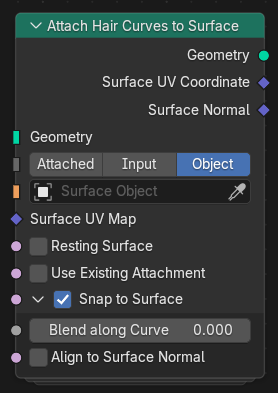
The Attach Hair Curves to Surface node binds hair curves to a surface mesh, establishing their attachment positions and optionally aligning them to the surface orientation. This node is a fundamental part of hair generation and grooming workflows, ensuring that curves remain anchored correctly to the underlying surface, even after deformation or topology changes.
Note
This node or modifier requires valid Surface geometry or object inputs, as well as a Surface UV Map, to function properly.
Inputs
- Geometry
The input geometry containing the hair curves to be attached to the surface.
- Surface Source
Defines how the surface geometry is provided for attachment.
- Attached:
Use the attached surface of the incoming hair geometry.
- Object:
Use an object reference as the target surface.
- Input:
Use a geometry input directly connected to the surface mesh.
- Surface Geometry / Surface Object
The surface object or geometry used as the attachment target. Its transforms must match the modifier object for proper alignment.
- Surface UV Map
The UV map used to determine the attachment points on the surface mesh. These coordinates are stored per curve to maintain attachment consistency.
- Resting Surface
When enabled, sets the surface mesh into its rest position before attachment. This ensures consistency when later deforming curves along the same surface.
Tip
When using this node with Deform Curves on Surface, enable Surface Rest Position if that operation comes after this one, so the attachment coordinates are recorded in the pre-deformed state.
- Use Existing Attachment
Samples the Surface UV Map at the attachment point and stores the UV coordinates for each curve. This allows later nodes to access or reuse the attachment data.
Snap to Surface
Projects the root of each curve onto the closest point of the surface mesh, ensuring that all roots lie directly on the surface.
- Blend along Curve
Blends the deformation or alignment effect gradually along each curve, from root to tip, instead of applying it uniformly.
- Align to Surface Normal
Rotates each curve so that its root direction aligns with the surface normal. This typically requires guide data or consistent curve orientation to produce stable results.
Outputs
- Geometry
The resulting geometry with updated curve attachments.
- Surface UV Coordinate
The UV coordinate on the surface mesh corresponding to each curve’s attachment point.
- Surface Normal
The normal vector of the surface mesh evaluated at each curve’s attachment point.